Proxmox with GPU passthrough
A k3s cluster with one control plane and two workers needs three machines. I have one PC: an i9-10900K, 32 GB of RAM and one RTX 3090. So the PC runs Proxmox VE as the hypervisor and the three nodes are virtual machines, one of them with GPU passthrough enabled.
This post covers the Proxmox side only: the three VMs, PCI passthrough of the RTX 3090 to one of them, and static DHCP addresses on the router. The k3s installation is a separate post.
The PC
| Part | What it is |
|---|---|
| CPU | Intel i9-10900K, 10 cores, 20 threads |
| RAM | 32 GB |
| Disk | 2 TB, ZFS |
| GPU | NVIDIA RTX 3090, 24 GB |
| Hypervisor | Proxmox VE 9.2.2 |
| Network | one bridge, vmbr0, on my home LAN. The host is 192.168.100.5 |
Proxmox is managed from a web UI on port 8006. It shows two storages on this host: local holds ISO images, local-zfs holds the VM disks.
Installing Proxmox: keep host drivers off the GPU
For passthrough, no driver on the Proxmox host may hold the GPU. A driver that has bound the card must release it before a VM can take it. The simpler state is that no host driver ever binds it.
The kernel in Proxmox VE 9.2 has three drivers that match an RTX 3090:
| Module | What it is |
|---|---|
nouveau |
the older open-source NVIDIA driver |
nova_core (with nova_drm) |
the new open-source NVIDIA driver in recent kernels |
nvidiafb |
an old framebuffer driver |
Blocking them starts at the installer. At the installer's boot menu, e opens the selected entry for editing. I added two parameters to the end of the line that starts with linux, then booted it with Ctrl+X:
nomodeset modprobe.blacklist=nova_core,nova_drm,nova,nouveau
| Parameter | Effect |
|---|---|
nomodeset |
the kernel loads no mode-setting graphics driver; the console stays on the plain framebuffer the firmware set up |
modprobe.blacklist=... |
the listed modules are not loaded automatically, from the start of boot |
The installed system has the same settings in two places. The kernel command line, /etc/kernel/cmdline:
root=ZFS=rpool/ROOT/pve-1 boot=zfs nomodeset modprobe.blacklist=nova_core,nova_drm,nova,nouveau
And a modprobe file, /etc/modprobe.d/pve-blacklist.conf:
blacklist nova_core
blacklist nova_drm
blacklist nova
blacklist nouveau
blacklist nvidiafb
The result can be read on the host while the GPU VM runs:
lspci -nnk -s 02:00
02:00.0 VGA compatible controller [0300]: NVIDIA Corporation GA102 [GeForce RTX 3090] [10de:2204] (rev a1)
	Kernel driver in use: vfio-pci
	Kernel modules: nvidiafb, nouveau, nova_core
02:00.1 Audio device [0403]: NVIDIA Corporation GA102 High Definition Audio Controller [10de:1aef] (rev a1)
	Kernel driver in use: vfio-pci
	Kernel modules: snd_hda_intel
"Kernel modules" lists the drivers that could handle the device. "Kernel driver in use" is the one that has it: vfio-pci, the stub driver Proxmox uses to hand a device to a VM. lsmod on the host shows no nouveau, nova or nvidia module loaded.
The plan: three VMs
| VM | ID | vCPU | RAM | Disk | What it becomes |
|---|---|---|---|---|---|
vm-1 |
100 | 4 | 4 GB | 60 GB | k3s control plane |
vm-2 |
101 | 4 | 4 GB | 60 GB | k3s worker |
vm-gpu |
102 | 8 | 16 GB | 200 GB | k3s worker with the RTX 3090 |
The GPU VM gets most of the resources because GPU workloads also need CPU, memory and disk for the model files. The other two only have to run Kubernetes itself and small services.
All three run Ubuntu Server 24.04.
Step 1: the Ubuntu ISO
Proxmox can download an ISO by itself, so nothing has to go through my laptop. In the UI: local storage, ISO Images, Download from URL. Paste the URL, press Query URL, and Proxmox fills in the file name and the size.
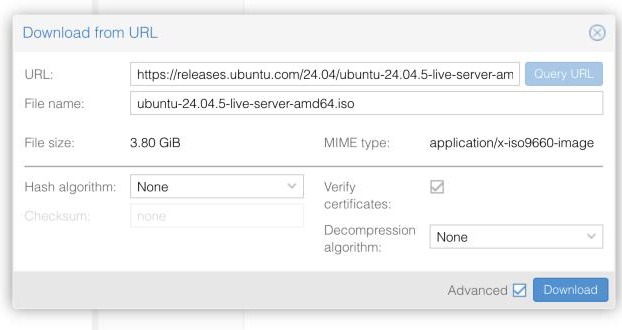
Before pressing Download I set Hash algorithm to SHA-256 and pasted the checksum from Ubuntu's SHA256SUMS file. Proxmox then verifies the 3.80 GiB file itself and refuses it if it does not match.
Step 2: two plain VMs
vm-1 and vm-2 are the Create VM wizard with its defaults, except three values: the ISO from step 1, a 60 GB disk on local-zfs, and 4 cores with 4096 MiB of memory.
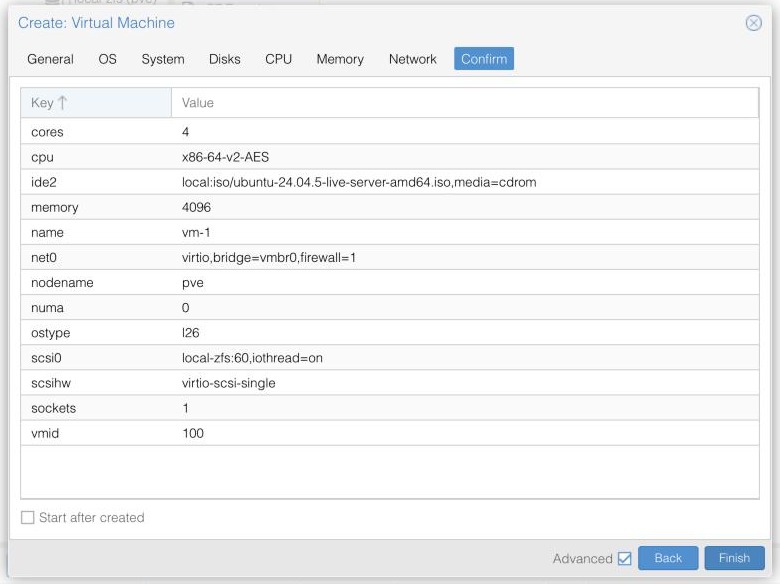
vm-1. vm-2 is the same with ID 101.The defaults mean a SeaBIOS firmware and the i440fx machine type. That is fine for a VM with no physical device attached.
Step 3: the GPU VM
What passthrough needs
PCI passthrough hands one physical device to one VM. The VM's operating system loads the normal driver and uses the card directly. The host and the other VMs cannot use it while that VM runs.
It has two requirements on the host. The first is the one above: no host driver holds the card. The second is the IOMMU (Intel calls it VT-d), a CPU and motherboard feature that limits a device to the memory of the VM it is given to. The IOMMU puts devices into groups, and a group can only be passed through as a whole. So the question for any card is: what else is in its group?
On this host the IOMMU was already active when I looked. Proxmox listed 16 groups, and the answer was the good one:
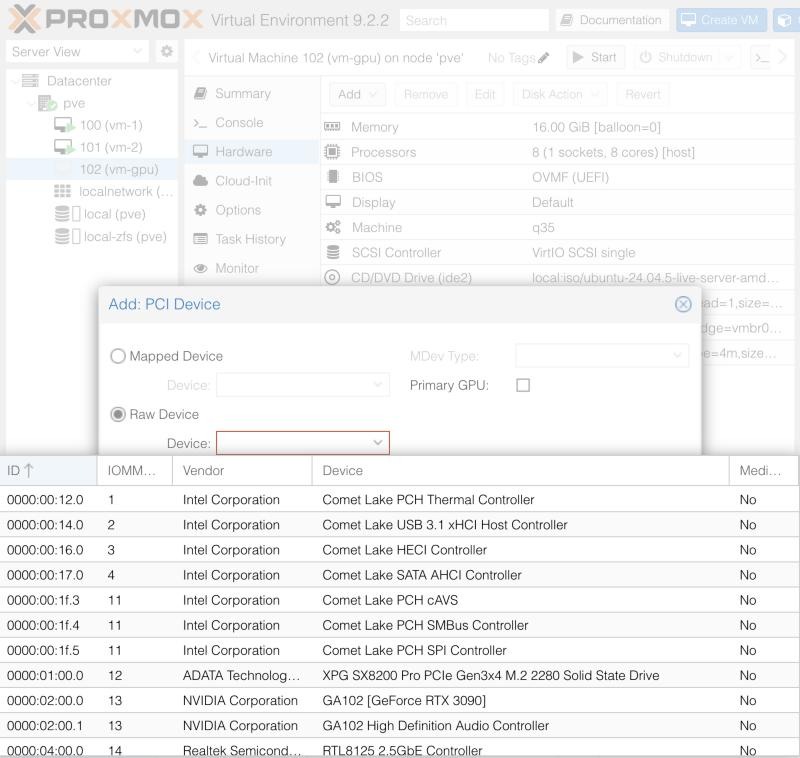
0000:02:00.0) and its HDMI audio function (0000:02:00.1) are the two devices in IOMMU group 13. Nothing else comes with them.The VM settings
Five settings differ from the two plain VMs:
| Setting | Value | Why |
|---|---|---|
| Machine | q35 |
the default i440fx has no PCI Express; q35 does |
| BIOS | OVMF (UEFI), Pre-Enroll keys off | with the keys enrolled, Secure Boot is on and the NVIDIA kernel module has to be signed before it loads |
| CPU type | host |
the guest sees the real CPU and its flags instead of a generic model |
| Memory | 16384 MiB, Ballooning Device off | all memory of a VM with a passed-through device is pinned, so the balloon cannot give any of it back |
| Disk | 200 GB | room for container images and models |
The first two are on the wizard's System tab. Choosing OVMF adds an EFI disk, which needs a storage:
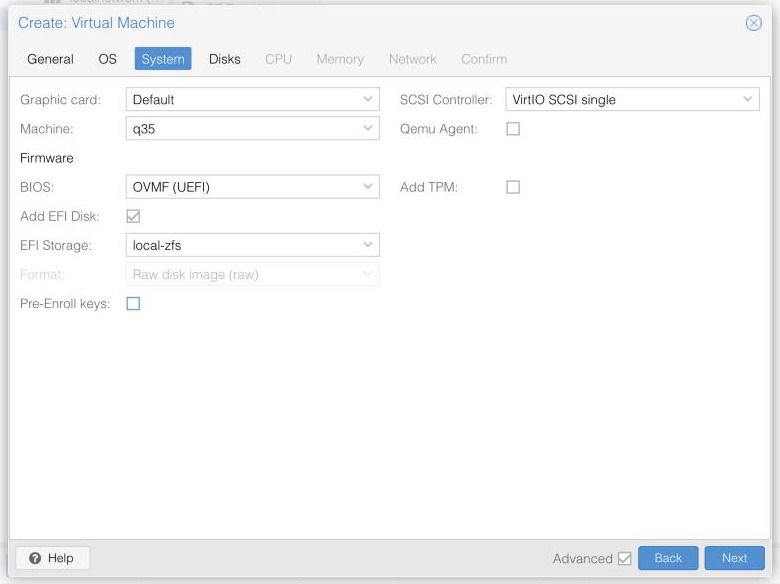
q35, OVMF, the EFI disk on local-zfs, and "Pre-Enroll keys" unticked.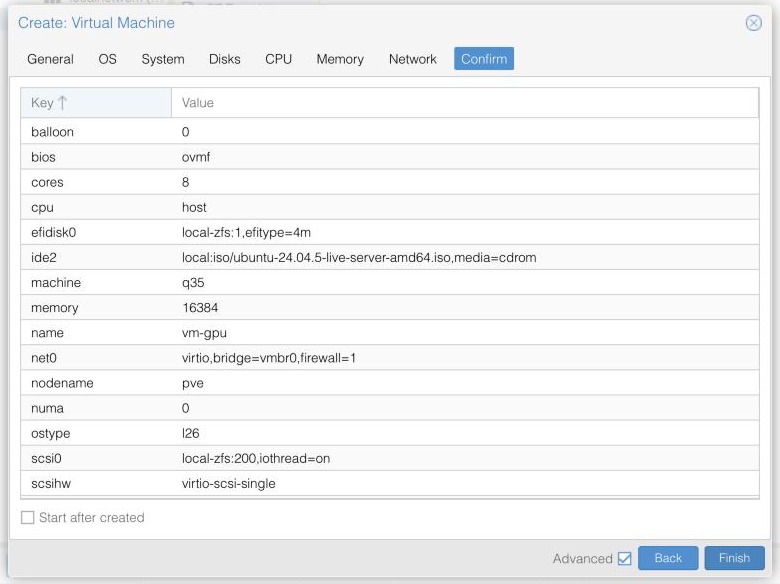
vm-gpu. "Start after created" stays unticked, because the GPU is not attached yet.Attaching the card
The wizard has no step for PCI devices. After the VM exists: Hardware, Add, PCI Device, Raw Device, pick 0000:02:00.0, then tick two boxes:
- All Functions passes
02:00.0and02:00.1together, the card and its audio function. - PCI-Express presents it to the guest as a PCI Express device. This is the option that needs
q35.
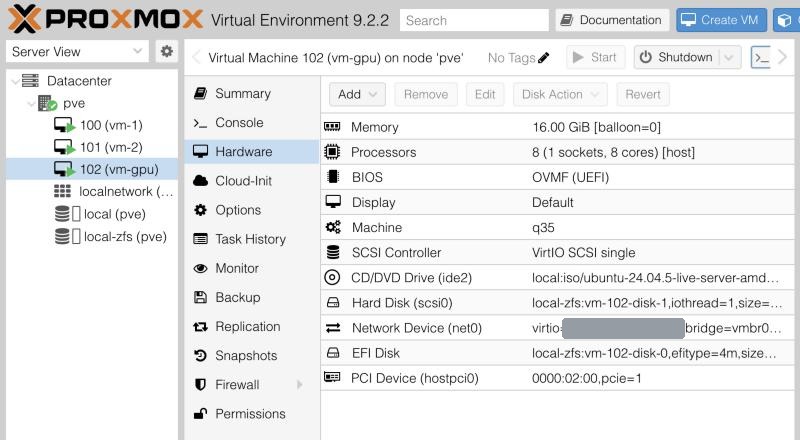
hostpci0: 0000:02:00,pcie=1, is the GPU. The network card's MAC address is covered.The GPU VM takes the monitor
Proxmox lists no other display adapter on this PC, so the RTX 3090 is also what drives the host's monitor. The moment vm-gpu starts, the card belongs to the VM and the monitor goes dark. The web UI and SSH keep working, because they do not need the screen.
That matters after a host reboot. If vm-gpu started by itself at boot, the host would have no screen, and I could not get to it from the monitor.
So the rule for this host: vm-gpu never has "Start at boot" on. The setting is on the VM's Options tab and is off by default. I checked it after creating the VM, and it is the first thing to check again after changing that VM. After a reboot the screen stays with the host until I start the GPU VM by hand.
The second thing to know is memory. With all three VMs running, the host showed 27 of 31 GiB in use. The VMs add up to 24 GB, and the GPU VM's 16 GB are pinned. There is no room for a fourth VM.
Step 4: install Ubuntu
Each VM boots the ISO, and the installer runs in the VM's Console tab. I took the defaults, with two things to note:
- Network: leave it on DHCP. The installer shows the address the router handed out, for example
192.168.100.54/24onvm-2. Write the three addresses down, they are needed in step 5. - SSH: tick "Install OpenSSH server", or the console stays the only way in.
One default I did not expect: Ubuntu's installer gave the root filesystem only half of each disk, 29 GB of the 60 GB and 97 GB of the 200 GB. The rest is free space in the LVM volume group. I have not extended it yet.
Step 5: fixed addresses on the router
The VMs get their addresses from my router by DHCP, and a DHCP address is a lease: it can change. That will matter later, because the k3s workers find the control plane by its address. If vm-1 comes back with a different one, the workers lose the control plane.
There are two ways to pin an address:
| Way | Where it is set | What I chose |
|---|---|---|
| Static IP | inside each VM | no |
| Static DHCP (a reservation) | on the router, per MAC address | yes |
With a reservation the router always hands the same address to the same network card. Nothing is configured inside the VMs, and the addresses are all in one place.
The router identifies a card by its MAC address. Proxmox shows it on the VM's Hardware tab, in the Network Device (net0) line, as virtio=BC:24:11:…. Proxmox generates these, they all start with BC:24:11, and a VM keeps its MAC as long as the network device is not removed and added again.
My internet is TIME, and on its router the page is called DHCP Static IP Configuration: New, type the MAC address and the IP address, Apply. One line per machine:
| Machine | Address |
|---|---|
| Proxmox host | 192.168.100.5 |
vm-1 |
192.168.100.53 |
vm-2 |
192.168.100.54 |
vm-gpu |
192.168.100.55 |
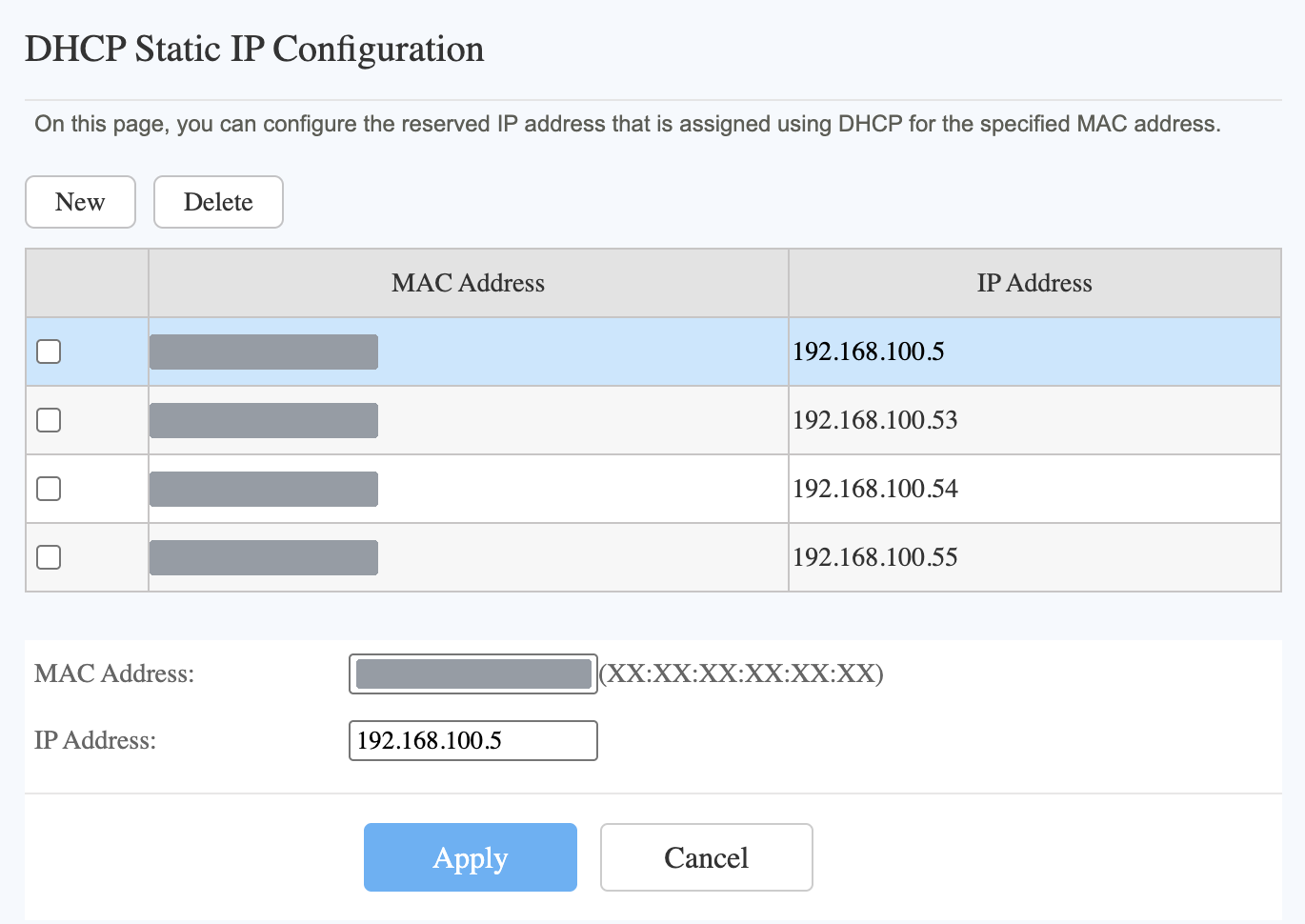
I did not pick .53 to .55. They are the addresses DHCP had already given the three VMs, and I reserved exactly those. A machine that holds a lease keeps it until it renews, so reserving the address it already has changes nothing on the VM. Reserving a different one would only take effect at the next renewal or reboot.
The router's DHCP range is 192.168.100.2 to 192.168.100.254. The four reserved addresses are inside that range, and this router accepts that.
Check: the card inside the VM
Passthrough is only proven from inside the guest. In vm-gpu:
lspci -nnk | grep -iA3 nvidia
01:00.0 VGA compatible controller [0300]: NVIDIA Corporation GA102 [GeForce RTX 3090] [10de:2204] (rev a1)
	Subsystem: Micro-Star International Co., Ltd. [MSI] GA102 [GeForce RTX 3090] [1462:3881]
	Kernel driver in use: nvidia
	Kernel modules: nvidiafb, nouveau, nvidia_drm, nvidia
The card is at 01:00.0 in the guest and 02:00.0 on the host. The guest has its own PCI layout, the two numbers do not have to match.
"Kernel driver in use: nvidia" is there because I had installed Ubuntu's nvidia-driver-580-server package and rebooted. With the driver loaded, nvidia-smi reports the whole card:
nvidia-smi --query-gpu=name,memory.total,driver_version --format=csv,noheader
NVIDIA GeForce RTX 3090, 24576 MiB, 580.178.04
What it looks like at the end
vm-1 |
vm-2 |
vm-gpu |
|
|---|---|---|---|
| Address | 192.168.100.53 |
192.168.100.54 |
192.168.100.55 |
| vCPU / RAM / disk | 4 / 4 GB / 60 GB | 4 / 4 GB / 60 GB | 8 / 16 GB / 200 GB |
| Machine and firmware | i440fx, SeaBIOS |
i440fx, SeaBIOS |
q35, OVMF |
| GPU | none | none | RTX 3090, all 24 GB |
| Start at boot | off | off | off, and it stays off |
Three machines with fixed addresses, one of them with a GPU that works. The next step is k3s: vm-1 as the control plane, vm-2 and vm-gpu as workers.